I use a ZWO ASI462MM and ASI290MM for recording asteroid occultations. I use “video mode,” usually with exposures of less than 1.0 seconds, though for faint targets longer times might be used. I control the cameras with SharpCap Pro.
Because occultation recording requires precise timing, I was testing my ASI462MM camera to try to understand the dead time characteristics for exposures of 1.0 seconds or longer. While doing so I encountered what appears to be anomalous behavior by the camera driver. If the camera is set to 1100, 1300, or 1600 milliseconds, the frame timing becomes unstable. The frame rate “toggles” between two rates, one about 10% greater than the other, in an unpredictable way.
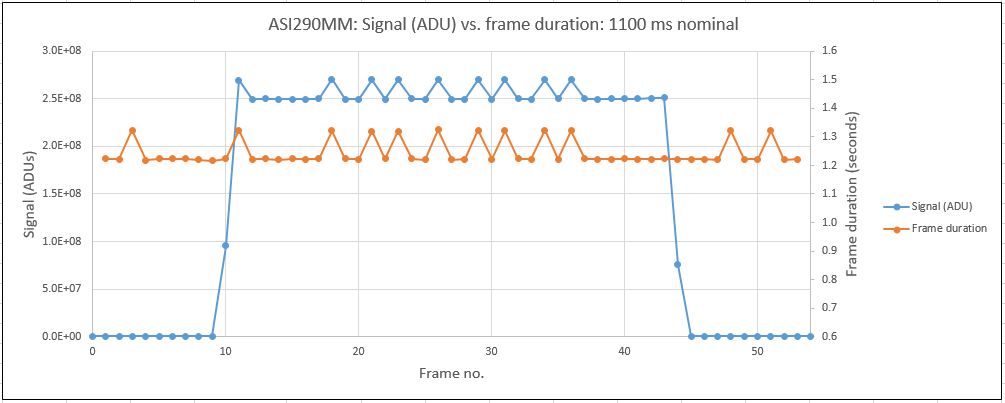
I set up a test fixture with a diffuse LED light source controlled by a stable voltage-controlled current source. The LED was mounted in a cap that fit closely over the 1.25” barrel of the camera, excluding all other light. A recording was made starting with several frames of dark, followed by about 35 seconds of light, and ended with more dark frames. For exposure times other than those mentioned above, the signal from the LED pulse is stable, but if one of those exposure times is set, the signal is unstable. Calculating the frame duration by subtracting one frame time stamp from the next and plotting those times along with the camera signal level, it’s clear the variations in signal level are due to the changes in exposure time. The included figure shows the camera signal in ADUs (in blue) and the exposure duration in seconds (in orange).
I have never tried attaching images to a forum post, hopefully they will come through.
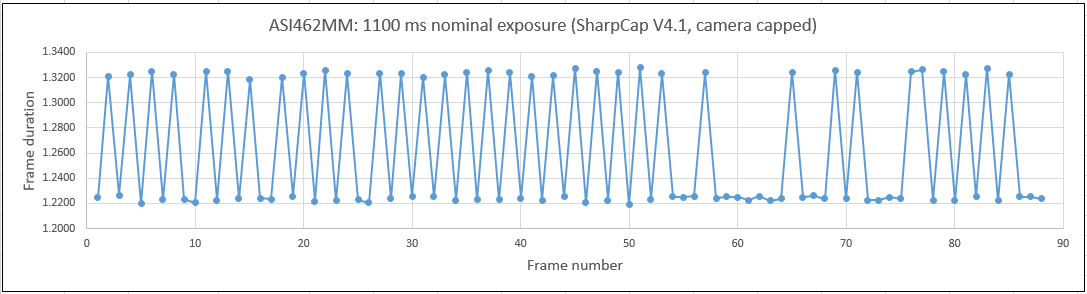
I also found that simply recording dark frames with exposure times of 1100, 1300, or 1600 ms would demonstrate the instability, as shown in the second figure, so no test fixture of any sort is needed. Just put the supplied cap over the 1.25” barrel, set the exposure to one of the three times that cause problems, and record a series of dark frames with SharpCap.
This problem is not just one camera. My ASI462MM, ASI290MM and ASI462MC all show this anomalous timing behavior, and they do so with two different computers: a Windows 10 desktop and a Windows 11 laptop. Obviously the common component in the setups is the driver.
This really needs to be fixed. Many observers around the world are using your cameras for recording occultations and they need consistent, predictable timing. There are additional issues with the exposure timing longer than 1.0 second, but this is the most pressing.
Thank you for considering this report.
Robert Jones
International Occultation Timing Association
California, USA